
HubSpot Gold Solutions Partner
HubSpot Consultancy, Onboarding and Implementation
When marketing, sales and service run on disconnected tools, leads slip through the gaps, reports disagree and teams lose hours to admin. Cybersolve helps businesses make HubSpot work around the way they sell.
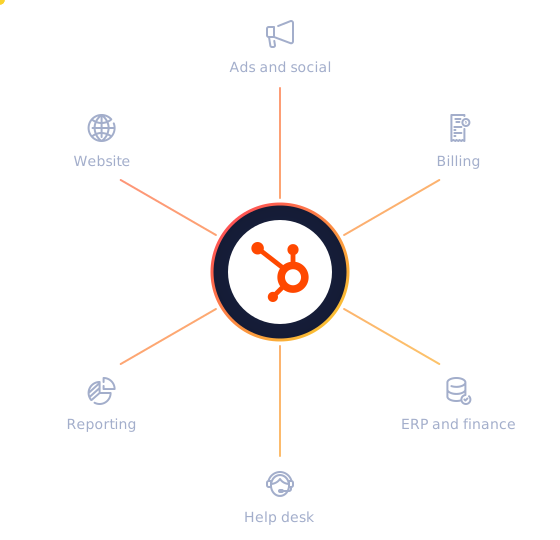
● New lead routed
Lifecycle stage updated and owner assigned
● Invoice synced
Billing status now shows on the deal record
Trusted by businesses like these

















Cybersolve is a HubSpot Gold Solutions Partner that onboards, implements and manages HubSpot for businesses around the world, from first set-up to everyday support.
What the service covers
CRM set-up and data modelling, migration from other CRMs, integrations with the platforms your teams already use, marketing and sales automation, reporting, AI agent set-up, training and ongoing portal management. The aim is a HubSpot portal your teams trust and actually use.
HubSpot Gold Solutions Partner, with a HubSpot-certified team
100+
HubSpot implementations
5,000+
Digital campaigns launched
53%
Average increase in leads within 12 months
Why teams call us
When your systems don't work together, neither can your teams
Five problems come up again and again in growing businesses. Each one has a practical fix in HubSpot.
The problem
What changes
Customer data is spread across disconnected tools
One connected record of every contact, company and deal, kept in sync with the systems you keep
Leads stall between marketing and sales
Clear lifecycle stages, scoring and handover rules, so every lead has an owner and a next step
Hours go on manual updates and copy-and-paste
Workflows that update records, assign tasks and send follow-ups without anyone remembering to
Nobody fully trusts the reports
Dashboards built on clean data, with pipeline and marketing performance in one place
The portal grew without a plan
A tidy structure, naming rules and governance that keep HubSpot usable as you grow
Not sure what to fix first? A short consultation is usually enough to map the priorities.
Book a HubSpot consultationConnected systems
Cleaner data
Automated processes
Reports you can trust
Sales and marketing as one team
Connected systems
Cleaner data
Automated processes
Reports you can trust
Sales and marketing as one team
HubSpot services
From first set-up to everyday support
Six ways to get HubSpot working for your teams, on their own or combined.
HubSpot onboarding
Start on HubSpot with a set-up that fits your sales process from day one: portal configuration, users and permissions, pipelines and properties, email and domain set-up, and your first automations.
Suits teams that have just bought HubSpot or are moving up to Professional or Enterprise.
Onboarding scope
Portal configuration
Users and permissions
Pipelines and properties
Email and domain set-up
Your first automations
Managed HubSpot and RevOps
Keep HubSpot healthy after launch, with new workflows and reports as your needs change, and someone your users can turn to.
Suits teams where nobody in-house has the time to own HubSpot.
Training
Help your team use HubSpot with confidence, with sessions built around your own portal and processes rather than generic tutorials.
For new users, admins and the managers who rely on the reports.
Implementation and CRM migration
Move from Salesforce, Zoho or spreadsheets without losing history: mapping your data and processes, moving records and their history, and rebuilding workflows and reports in HubSpot.
Suits companies replacing another CRM or rolling HubSpot out across several teams.
How a migration works
From Salesforce, Zoho or spreadsheets
1 Map data and processes
2 Move records and history
3 Rebuild workflows and reports
Into HubSpot
Integrations
Connect HubSpot to the platforms your teams already use, from Salesforce and NetSuite to Jira, Aircall and Shopify, so everyone works from the same numbers.
New
AI agents
Put HubSpot's AI agents to work on routine tasks, with the right use cases chosen, the business context they rely on set up, and a careful roll-out.
Where agents help
01 Answering common customer questions
02 Preparing handover notes between teams
03 Reviewing data quality in your CRM
Integrations
Connected to the tools your business already relies on
Platforms Cybersolve regularly connects to HubSpot, grouped by what they do for your teams.
CRM and sales

Salesforce

Pipedrive

Salesloft

Zoho CRM

Prospecting and data quality

Apollo.io

ZoomInfo

Lusha

ZeroBounce

NeverBounce
Finance and billing

NetSuite

QuickBooks

Sage

Xero

Stripe
Websites and e-commerce

WordPress

Webflow

Wix

Shopify

Adobe Commerce
Email and inboxes

Mailchimp

Brevo

MailerLite

Gmail

Outlook
Calling and messaging

RingCentral

Aircall

Kixie

Heymarket

Twilio

Work management

Jira

Asana

monday.com

Trello

Notion
Collaboration and AI

Slack

Microsoft Teams

Google Workspace

ChatGPT

Claude
Using something that isn't listed? If it has an API, it can usually be connected.
Ask about your integrationWho Cybersolve helps
HubSpot expertise across industries
Businesses in every sector run on HubSpot. These are the industries where Cybersolve's experience runs deepest.

SaaS and technology
Lifecycle stages that follow trials and demos through to paying customers, product and subscription data alongside the CRM record, and attribution that shows which channels drive revenue.

Financial services and fintech
Fast lead qualification and routing, accurate customer records, and HubSpot connected to the systems that hold accounts and payments.

Professional services and consultancies
A clear view of proposals and pipeline across partners, automated client onboarding, and consistent follow-up that turns expertise into new work.

Real estate and property management
Enquiries, viewings and offers tracked against each contact, timely follow-up for buyers, sellers, landlords and tenants, and a clear view of listings and deals in progress.

E-commerce and retail
Store, order and customer data in one place, so you can segment by what people buy, automate post-purchase follow-up and see which campaigns drive repeat sales.

Education and training
Enquiries, bookings and renewals managed in one CRM, with automated reminders around intakes and deadlines and email nurture that keeps past learners and client organisations engaged.
Whatever your sector, if your teams sell, serve or market through HubSpot, Cybersolve can help.
How engagements work
Plan, build, grow
Six steps in three phases, with a dated plan agreed after discovery. Timelines depend on scope, data volume and integrations.
01
Plan
Discovery
Map how leads, deals and customers move through your business today, and agree what success looks like.
Design
Plan the data model, lifecycle stages, pipelines, automations and integrations before anything is built.
02
Build
Build and integrate
Configure HubSpot, migrate data and connect your other systems.
Test
Check that data, workflows and integrations work for your real scenarios before go-live.
03
Grow
Train and hand over
Train each team on its own processes, so everyday changes don't depend on Cybersolve.
Optimise
Refine automations and reports as you use them, or continue with managed support.
Why teams choose Cybersolve
Practical HubSpot expertise, in your working day
Founded in 2015, with more than 100 HubSpot implementations behind the advice.
Book a HubSpot consultationDiscovery before configuration
Every build starts with how your business actually sells and serves customers, so HubSpot reflects your process instead of forcing a new one.
Built for your team to own
Training around your own portal means your people can manage everyday changes themselves.
Working hours that suit you
Delivery is remote from South Africa (UTC+2), close to UK and European working hours, with morning overlap for teams in the Americas.
Experience behind the advice
A HubSpot Gold Solutions Partner with a HubSpot-certified team and more than 100 HubSpot implementations behind it.
In their words
What clients say
Five-star reviews from HubSpot's Solutions Directory and Google.
“Helped us with our dashboard building. We could finally see what was happening in our business: our sales process, the customer journey and marketing automation.”
HK
H.K.
Banking and Financial Services · HubSpot review
★★★★★
“It is truly a pleasure doing business with Cybersolve. Your quick responses and efficient turnaround times are the reason I return to your services every time.”
D
Deon
SaaS · Google review
★★★★★
“Cybersolve have gone above and beyond when creating HubSpot website and landing page elements for our brand. They interpreted our corporate identity excellently and have helped train us in how to use and create our own versions for future projects. 10/10, would recommend.”
L
Lauren
Branding and Advertising · HubSpot review
★★★★★
Watch
Why businesses choose HubSpot
HubSpot's own short film on what the platform does for growing businesses.
Platform coverage
Every HubSpot Hub, set up to work together
Six Hubs on the same Smart CRM. Most businesses start with one or two and add more as they grow.
Marketing Hub
Email, ads, social, content and campaign reporting on the same CRM your sales team uses. Automation nurtures leads until sales is ready, and AI agents help with content and campaigns.
Marketing Hub servicesSales Hub
Deal pipelines, lead management and sales automation in one workspace. Reps spend less time on admin and more time selling, with guided selling and prospecting support built in.
Sales Hub servicesService Hub
A help desk that brings every channel into one workspace, with SLA management and customer feedback. A customer agent can answer routine questions, so your team focuses on the complex ones.
Service Hub servicesContent Hub
HubSpot's CMS for your website, blog and landing pages, with AI tools to create and repurpose content. Every visit and form fill links straight to the contact record.
Content Hub servicesData Hub
Data sync, data quality tools and automation that turn scattered data into records your teams can trust, and keep HubSpot in step with your other apps.
Data Hub servicesRevenue Hub
Quotes, CPQ, subscription billing and payments linked to every deal, so you can quote, bill and collect in HubSpot. Formerly Commerce Hub.
Revenue Hub servicesSmart CRM underpins every Hub
Smart CRM servicesAI agents across the platform are managed in Agent Hub
HubSpot pricing
What will HubSpot cost?
HubSpot offers per-seat pricing alongside its established plans, so what you pay depends on the Hubs you choose, the edition, the number of seats and the credits you use. Cybersolve will work out the right set-up and cost for your team before you commit.
What makes up the cost
Edition
Starter, Professional or Enterprise
Seats
Paid seats only for the people who need them
Credits
A monthly allowance for AI features and agents
Onboarding fee
$1,500 to $7,000
Waived*
* For Marketing, Sales and Service Hub Professional and Enterprise, when Cybersolve leads your onboarding.
What is the difference between onboarding, implementation and managed support?
Onboarding sets up a new portal and gets your team started. Implementation is a larger build, such as a CRM migration, integrations or a roll-out across several teams. Managed support is ongoing help after launch.
How long does a HubSpot implementation take?
It depends on how many teams and Hubs are involved, how much data moves and how many systems connect. You get a dated plan after discovery, before any build starts.
How much does HubSpot consultancy cost?
Projects are quoted after a scoping call, based on the Hubs involved, data volume, integrations and training needs. Your HubSpot subscription is a separate cost.
Can you take over a portal another partner set up?
Yes. Fixing an existing set-up starts with understanding what is there and what is causing problems, then agreeing what to change first.
Who owns our HubSpot portal and data?
You do. Your business keeps access to its HubSpot portal and owns the data in it, whoever set the portal up or pays the subscription.
Do you work with businesses outside South Africa?
Yes. Cybersolve delivers remotely from South Africa and works with clients in South Africa and across Africa, the UK, the US and Australia, with calls scheduled in your time zone.
Can you work alongside our in-house HubSpot admin?
Yes. Cybersolve can take on specific projects, such as a migration or an integration, while your admin runs HubSpot day to day, and can train your admin on what has been built.
Which HubSpot editions do you work with?
Cybersolve works with Starter, Professional and Enterprise subscriptions across HubSpot's Hubs. If you are still deciding, Cybersolve can help you assess the right overall edition and number of seats before you buy.
Get in touch
Let's make HubSpot work for your business
Tell Cybersolve what isn't working today, and get practical next steps from a HubSpot specialist.
A HubSpot specialist reads every enquiry
No obligation and no hard sell
Calls scheduled in your time zone
Book a HubSpot consultation
Hang tight! Your form is loading...