
HubSpot Smart CRM services
HubSpot Smart CRM, set up for a clearer view of every customer
HubSpot Smart CRM is the customer database every HubSpot Hub runs on: contacts, companies, deals, tickets and every conversation in one place, with AI that keeps records current. It comes with every Hub, or can be bought on its own at Professional or Enterprise. Either way, it is only as useful as the way it is set up. Cybersolve designs the data model, moves and cleans your data, and connects Smart CRM to the rest of your business.
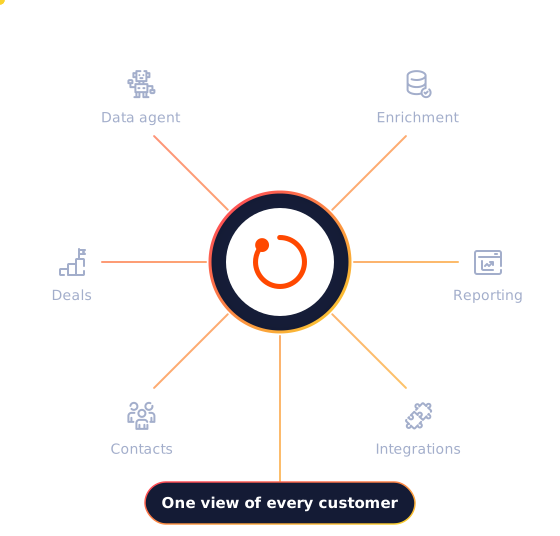
● Record enriched
Company details filled in automatically
Trusted by businesses like these

















What's new
AI that keeps your records current
Smart CRM now captures calls, emails and meetings automatically, and uses AI to enrich, clean and answer questions about your records. As of October 2026, these are the features that most affect data quality, admin time and reporting.
Breeze Assistant
HubSpot's AI assistant, now able to take actions and hand work to agents, included in every edition.
All editions
Data enrichment
Fills in and updates contact and company details from more than 200 million buyer and company profiles.
Starter and up
Data agent
Answers questions about your customers from the CRM, calls, emails, documents and the web.
Uses credits
Professional and Enterprise
Duplicate management
Finds likely duplicate records with AI so they can be merged, cutting clean-up time.
Professional and Enterprise
Data quality overview
Scans the CRM for data problems, every two weeks on Starter and daily from Professional.
Beta
Starter and up
Customer agent
Answers customer questions on chat and email from your own content. Credits are used only when it resolves a conversation.
Professional and Enterprise
Prospecting agent
Researches accounts and drafts personalised outreach. Credits are used per lead it writes outreach for.
Professional and Enterprise
Agent builder
Build your own AI agents: simple ones on Starter, more advanced ones from Professional.
Beta
Starter and up
Many AI features run on HubSpot Credits. Paid editions include a monthly allowance (500 on Starter, 3,000 on Professional, 5,000 on Enterprise), and more can be bought. Features marked Beta may change.
The numbers
Customer data in one place pays off
HubSpot's own figures, across the whole platform.
83%
Of interviewed HubSpot buyers and users say HubSpot is effective at unifying their company's data in one place
84%
Of surveyed HubSpot customers increased company revenue
95%
Of surveyed HubSpot customers achieve a positive return on investment
Source: HubSpot ROI Report 2025: 424 video interviews with software decision makers and CRM users (January 2025) and a survey of 1,546 CRM users (August 2025). Results for individual businesses vary. These are HubSpot's figures, not Cybersolve's.
Want to know what is holding your CRM back?
Book a Smart CRM consultationFeatures
What Smart CRM gives every team
The foundations, before any Hub is added.
Contacts, companies and deals
Every contact, company, deal and ticket with its activity history, and pipelines from 15 on Starter to 350 on Enterprise.
A data model that fits
Custom properties from Starter, calculated properties from Professional, and custom objects and sensitive data on Enterprise.
Connected to your other tools
More than 2,000 apps in the HubSpot Marketplace and two-way data sync, with custom API integrations where an app does not exist.
Reporting across teams
Dashboards across marketing, sales and service, custom reports from Professional, and an audit log of changes made by people, automation and AI.
Editions and pricing
Which edition fits
HubSpot's free CRM covers up to two users and 1,000 contacts. Starter adds permissions and enrichment, Professional adds AI agents, clean-up tools and custom reports, and Enterprise adds custom objects and tighter control.
Starter
Suits
Small teams moving off spreadsheets
What it adds
Required fields, permission sets, multiple currencies, automatic enrichment and no HubSpot branding
Professional
AI agents and custom reports start here
Suits
Growing teams that need clean data and reporting
What it adds
Duplicate management, contact scoring, calculated properties, custom reports, the customer agent and the data agent
Enterprise
Suits
Larger businesses with a complex data model
What it adds
Custom objects, sensitive data, a sandbox, teams, single sign-on and field-level permissions
HubSpot pricing
What will Smart CRM cost?
Smart CRM comes included with seats of other HubSpot products, or can be bought on its own at Professional or Enterprise. HubSpot prices it per seat, so what you pay depends on the edition, the number of seats and the credits you use. Cybersolve will work out the right set-up and cost for your team before you commit.
What makes up the cost
Edition
Starter, Professional or Enterprise
Seats
Paid seats only for the people who need them
Credits
A monthly allowance for AI features and agents
Onboarding fee
None
HubSpot does not charge an onboarding fee for Smart CRM on its own. Cybersolve can still lead your set-up.
Services
How Cybersolve helps
Set-up gets a new or restarted CRM working. Migration moves your data from another CRM, starting with an audit. Data model and integration work makes HubSpot fit your business, and managed CRM keeps it healthy.
Service
When it fits
What you get
CRM set-up
You are new to HubSpot or starting again
Properties, pipelines, permissions and dashboards designed around how your teams sell and serve, with your team trained
CRM migration
You are moving from Salesforce, Pipedrive, Zoho or another CRM
Contacts, companies and deals mapped and moved. How much history can move depends on the source system, so scope is agreed after an audit
Data model and integrations
HubSpot needs to fit your business and connect to finance, ERP or product data
Custom properties, custom objects on Enterprise, and integrations through native apps or custom API work
Managed CRM
You want someone to keep the CRM healthy
Ongoing data quality, permissions, reports and changes from a HubSpot-certified team
For day-to-day CRM administration and adoption, see CRM management. Platforms Cybersolve regularly connects include NetSuite, QuickBooks, Sage, Salesforce and Shopify.
HubSpot's current catalog lists no onboarding fee for Smart CRM. If you are also buying Marketing, Sales or Service Hub Professional or Enterprise, HubSpot's onboarding fee for those can be waived when Cybersolve leads your onboarding, for customers in the UK, the US and South Africa.
Watch
What is HubSpot?
HubSpot's short overview of the customer platform, with Smart CRM at its centre.

Why Cybersolve
A CRM built around your business, not the default settings
HubSpot Gold Solutions Partner with a HubSpot-certified team
More than 100 HubSpot implementations
RevOps, integrations and CRM management under one roof
Founded in 2015
“Helped us with our dashboard building. We could finally see what was happening in our business: our sales process, the customer journey and marketing automation.”
HK
H.K.
Banking and Financial Services · HubSpot review
★★★★★
Built on Smart CRM
Add Hubs as your teams grow
Each Hub adds tools for one team, working on the same customer records.
What is HubSpot Smart CRM?
HubSpot's CRM: the shared customer database every HubSpot Hub runs on. It holds contacts, companies, deals, tickets and activity, with AI that enriches, cleans and answers questions about your records.
Is the HubSpot CRM free?
There is a free CRM for up to two users and 1,000 contacts, with no time limit. Starter, Professional and Enterprise add permissions, enrichment, AI agents, custom reporting and higher limits.
Do we need Smart CRM if we buy a Hub?
It comes included with seats of other HubSpot products, so every Hub already runs on it. It can also be bought on its own at Professional or Enterprise, for teams that need the CRM without a full Hub.
How much does Smart CRM cost?
Paid editions are priced per seat, and the total depends on the edition, the number of seats and the HubSpot Credits you use. Cybersolve works out the cost for your team before you commit.
Does Smart CRM include custom objects?
On Enterprise. Custom objects, sensitive data and a sandbox for testing changes are Enterprise features; Professional adds calculated properties and custom reports.
Can you migrate our CRM to HubSpot?
Yes. Salesforce, Pipedrive, Zoho, HighLevel, ActiveCampaign and Marketo are among the platforms Cybersolve migrates from most often. Scope is agreed after an audit of your current data.
Get in touch
Get a CRM your teams trust
Book a consultation and tell Cybersolve where your customer data lives today. Cybersolve will talk you through the options for setting up, moving or cleaning up Smart CRM.
Your enquiry goes to a specialist, not a sales script
No obligation and no hard sell
Calls arranged around your time zone
Book a consultation
Hang tight! Your form is loading...